What is USB-C ?
So, What actually is “USB-C” ? – Lets take a look.


We’ve all (I hope) been around for USB 1.0, 2.0, 3.0 and more recently 3.1 – which all essentially used the same plug/port design and the only difference between them were just upgraded speeds and ever so slight increases in power outputs to power external devices over the years to support newer hardware and requirements.
Speed Comparison Chart
USB1.0 – 12Mbit/s (1.5 MB/s)
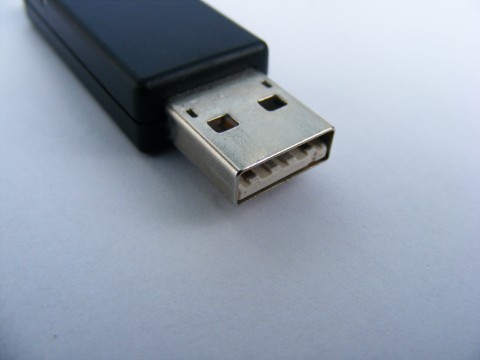
USB Type-A
USB2.0 – 480Mbit/s (60 MB/s)
USB3.0 – 3GBit/s (375 MB/s)
USB3.1 – 10Gbit/s (1.25Gb/s)
Tip: Internet Providers measure there broadband services in Megabits & there are 8 Megabits in a Megabyte, which may answer some broadband speed questions.
Now, it’s not the first device with a USB-C connection but with the recent reveal of the new Mac Book people have seen USB-C and started asking questions about it, well “USB 3.1 Type-C” is a 3.1 cable with a new plug.
It refers nothing to the performance of the cable, it’s quite simply – USB 3.1 “Type C” Plug.
However, it’s a very important plug, it was developed by the USB Implementers Forum which is a none profit organisation with over 750 members which include: Microsoft, Apple, Nokia, Dell, HP, Intel, and Samsung. – so this thing, will be adopted on mass.
So, What’s the big deal ?

MiniUSB (Type B, Typically used with Printers)
First of all,
Type-C USB cables, are the same at both ends of the cable unlike current USB cables which typically have a standard USB (USB-A) on one end to plug into your computer, then a Mini-USB (USB-B) / Micro-USB (a USB-B variant) or some proprietary plug on the other end in order to plug/charge your printer, mobile phone, sat nav & other computer peripherals – which was inconvenient & lead to us all having a dozen different USB cables lying around the house and never remembering what device it plugged into.
Another inconvenience with traditional USB plugs is all of them have to be plugged in the right way which can be frustrating even for people who work with them daily, USB-C fixes this problem by being able to be inserted right-side up or upside down it doesn’t matter.
The USB 3.1 Type-C cables also uses the USB3.1 Standard, which was released in 2013 but the uptake has been very slow no doubt due to the C-Type developments but nevertheless this where the boost in specifications & performance come into it.
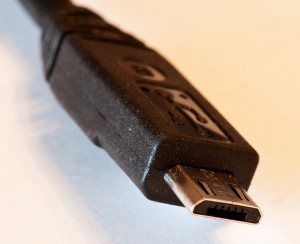
MicroUSB – a Type B Variant
We get a lot more speed, up to 10Gbit/s in fact.
The cable can also carry a lot more power, the existing USB3.0 standard is only capable of giving out 5v at 1.8A which is enough to charge an average mobile phone or low rpm hard drive – While the new USB3.1 can also handle up to 20v (100w) at 2A of bi-directional power, which opens up a lot of charging possibilities, and it also means USB cables will be able to power much stronger hardware in general – eliminating a lot of the clutter when devices need a separate power cable.
the Type-C Plug is also a similar size to current Micro-USB plugs (the one most people use to charge mobile phones) so there will be no need to shrink the connector at a later date to accommodate slim line hardware like there was with USB-A & B.
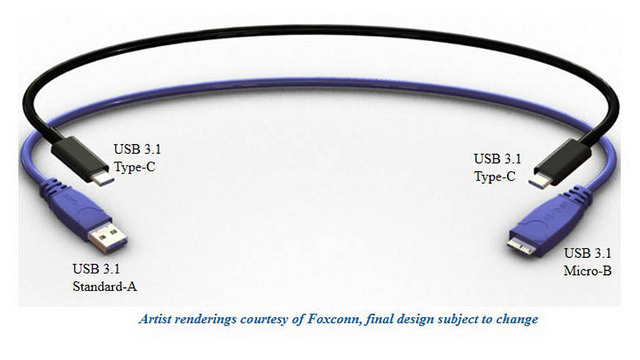
USB Cable Comparison – Artist Rendering
As I stated before USB-IF has over adopted by over 750 manufacturers as members and USB-C supposed to be landing in full force during summer 2015, – So this plug is what we should all be using for our docking, charging, device to device connections and anything in between over the next few years, finally a truly universal connector.
So, What’s the catch ?
Unfortunately USB-C is not backwards compatible with traditional USB Ports however there will be a huge supply of adapters & USB-A to USB-C cables etc to see us through the conversion.
Certainly the pros out-weigh the cons & I hope this has given you some idea’s as to what USB-C.
About the Author

Blank3k: I love talking about technology, but I always try to keep things realistic & informative.
-
 EE TV – Unboxing & First Impressions
I have been well versed with Telewest Cable, experienced many revised TV Set Top Boxes & remain subscribed to the now named Virgin Media – Tivo service. I’ve also had plenty of... -
 Tidal – The New Music Streaming Service
People have no doubt heard about the “Tidal” music streaming service event in which many popular music artists signed there names to the service. If not – then...